Our assignment for class this week called for us to share our opinions on evaluating students’ use of technology tools. When doing so the first thing a teacher needs to determine is what is being evaluated. Is it the technology tool itself, in terms of the student mastery of the tool or is it the actual information that is being presented? (feel free to refer back to my post on teaching technology in isolation). Is the technology simply ‘taking the place’ of another presentation modality or is it giving students access to things they wouldn’t be able to access otherwise?
In the case of evaluating the “tool” there are many rubrics currently available for assessing multimedia projects. Kathy Schrock has an entire page of rubrics to choose from as well as additional links. Learn NC a program within the University of North Carolina at Chapel Hill offers up a guide to evaluating multimedia presentations as well. Here's even one more link, just for fun.
If you are evaluating the presentation of information through the use of technology, however, you need to become even more selective. There is an excellent article in Edutopia (which subsequently is the focus of a blog on Evaluating Technology Use in the Classroom ) that breaks down evaluating students’ use of technology into 3 categories:
1. Doing Old things in Old Ways (typing a paper in Word as opposed to writing it out)
2. Doing Old things in New Ways (instead of reading about MLK’s famous speech, students now listen to it or watch a video clip of it)
3. Doing New things in New Ways (does the use of technology allow the students to reach audiences they would not be able to reach without it?)
Within my experience many educators are currently in the old things/old ways and old things/new ways categories. That’s ok. It’s a starting point. Technology is not going to become a permanent teaching tool for these teachers if they are suddenly forced to do new things in new ways. A good starting point is to have them move their students away from the old methods of presenting (be it lecture or powerpoint). To see examples of this see a handout I made for our 8th grade students. I say this because a new way of presenting something may spark an interest in the student. They may then become open to learning other new things as well. One difficulty however is getting teachers and students beyond the oooo and ahhh of the bells and whistles and to evaluate the content of the presentation. Here’s a link to an educator’s guide to evaluating the use of technology in schools.
Thursday, February 11, 2010

Monday, February 8, 2010
What is Great Professional Development?
The National Staff Development Council defines professional development as “a comprehensive, sustained, and intensive approach to improving teachers’ and principals’ effectiveness in raising student achievement.” They say professional development should be aligned with student state standards, conducted by educators (or knowledgeable well-prepared individuals), and take place more than a one-and-done session (initially several times a week).
The majority of the professional development sessions I have attended have met some, if not all, of the criteria at one point or another. So does that alone make them great? How does one truly define a *great* professional development?
When I first looked at this blog prompt my first instinct was to write about a great professional development sessions I gave. In the fall as part of my Study Group Coach grant obligations for the Chicago Foundation for Education I presented at their Teachers as Leaders and Learners Conference. This was my third year presenting at this conference. In fact, I was fortunate enough to have a lady approach me and say that she was excited I was presenting since she had seen me present before and would be in any session I taught that day because of her past experience with other sessions I lead. That sure was nice to hear.
I lead a session based on my Study Group, “The Web 2.0 Classroom.” It was well attended in both sessions. There was audience participation. One teacher reached out after the session for additional resources (which I spent my break at the conference researching for him). Why would I think of this session as a great professional development? Maybe it was because I was so energized and into the presentation that the vibe rubbed off on the participants. Maybe it was because I was able to provide them with resources they could immediately use. Maybe it was because they wanted and chose to be there so they were more receptive. In any case, in my opinion it was a great professional development. CFE does a great job of providing feedback to its presenters. I’m anxious to see the comments of the participants to see if their thoughts mirrored mine.
In terms of a professional development session that I’ve attended that I found to be great I would have to say there are two related to the current masters program I am in. These two workshops t have proven to be beneficial to my current position as a Lead Technology Teacher. The Web 2.0 and Digital Storytelling workshops were considered great for the following reasons:
*they provided me with knowledge I did not have (many of the professional development sessions I attend are things that I already know, or could have easily managed without the pd)
*they were relevant to my current teaching assignment (many of the pds I attend relate more to classroom teachers)
*they were presented by knowledgeable people that clearly researched and knew the content, and
*they were easily accessible and immediately transferable
Tuesday, January 26, 2010
Technology: Isolated or Integrated?
Should technology (computer skills, typing, software instruction, etc.) be taught as separate skills or as part of an integrated lesson? This is the question that is on the table this week in grad class. Seems fairly easy, yet not so easy to answer. In reality? I think it depends on the scenario, the assignment, and the students. For example a group of students working on the Adobe Youth Voices project needed to learn Premiere Elements in order to create their videos. There was minimal software instruction. I showed the students the layout of the software and the mechanics of importing media. From there the students basically figured it out, for lack of a better term.
Now that being said, in some respect their knowledge base was more limited by this approach. If they were lazy or not really into the project they simply did the bare minimum and stopped. If they were really into the project they constructed their own knowledge- they would play around to figure out how to do what they wanted to do, thus creating a far better project than the other students. If I was to teach the technology in isolation the “lazier” students would gain more knowledge. But would they more advanced group be itching to figure it out and move ahead to actually start their projects?
On the flip side there have been instances where technology in isolation was appropriate. Back in high school I learned how to type in isolation. Not glamorous, and at the time boring as hell. But…..that skill is one that is invaluable to my current job. In this particular instance I feel as if having a lesson looming while I was trying to learn the mechanics of typing would have been distracting and that I may not have learned to type as accurately as I did being taught in isolation.
So….should technology be taught in isolation or as part of an integrated lesson? In a word…..sometimes.
Saturday, January 23, 2010
Less Than Stellar Professional Development
The phrase “professional development” in the educational system is often met with a rolling of the eyes and a sigh from educators. Why is this? Is the common educator truly not interested in furthering their knowledge and skills? I do believe that is the case with some, but I don’t feel it is the case for the majority of professionals in the field. Why then is it such a struggle to find a happy medium? Here are some thoughts:
1. Many PD sessions are “one and done” or as stated so lovingly in the suggested reading by our professor, “spray and pray”. Most professional development sessions are conducted one time, usually to a mass group of people, with no follow up.
2. When constructed for entire faculties at one time many participants will have no use or relevance for the information presented.
3. Reflective of points 1 & 2, many participants are forced to attend these sessions, whether to acquire recertification credits or because the administration makes it mandatory.
4. In my experience many PDs seem as if they were thrown together at the last minute rather to fill time than to address individual needs by the faculty.
Our assignment for this blog post was to talk about the last awful professional development session we attended and why. The first example that came to mind was bad, but not for the reason that one might think.
Our school system has many tools available for our teachers to gain access to student data. The training session took place at our school in our computer lab. (Which leads to yet another compelling question: are the teachers completely “there” or are they distracted by the familiar surroundings, feeling more at ease with doing things other than what is in front of them?). There were two presenters from Chicago Public Schools conducting the session. One was presenting how to access the data through our intranet while the other walked around and made sure everyone was able to gain access.
Before the training began there was no assessment as to whether teachers had gained access to this site before or not. For those that had, they had little use for this information again (the information was an overview of how to access and manipulate the student data. For those who did not have classrooms of students, there was little relevance as well. These factors alone may have contributed to the reason I selected this as an awful professional development session. But honestly? They didn’t. My colleagues did. As the presenter was conducting the session there were many faculty members talking. More than once the presenter had to ask people to stop. Then there were those that chose to do other tasks, such as enter grades in the on-line gradebook. It reached a point that the presenter made a somewhat demeaning comment when she talked about how she liked the computer lab layout; she could see everyone’s screen at the same time. While this was a polite way of her asking us to get back on track I wondered: was this statement more demeaning for her? Or for us?
I felt extremely embarrassed for her. I felt extremely embarrassed for myself. Although I made sure to let her see I was paying attention the entire time (even though this pd had absolutely no relevance for me) I was embarrassed for the fact that some of the teachers help to fuel the stereotype that Chicago Public School educators are ignorant. While the content of the professional development isn’t what made it bad, the behavior of the crowd did.
Monday, January 18, 2010
J.P. Guilford
Joy Paul Guilford by Nicole and Shane
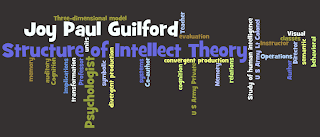
Structure of Intellect: Then and Now
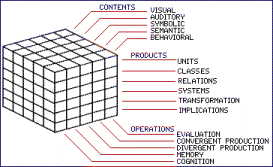
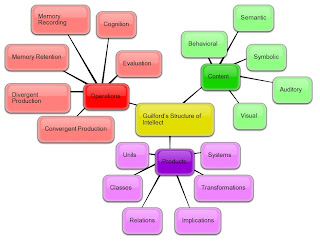
Theory in the Classroom
J.P. Guilford believed that with all the emphasis on testing students would not be taught to be creative when he stated:
"the quest for easily objectifiable testing and scoring has directed us away from the attempt to measure some of the most precious qualities of individuals and hence ignore those qualities.
Sources:
http://www.nap.edu/html/biomems/jguilford.pdf
http://www.indiana.edu/~intell/guilford.shtml
http://wapedia.mobi/en/J._P._Guilford
http://www.byuipt.net/wests/rick/2008/01/12/our-creative-society-the-visionary-jp-guilford-in-1950/
Web 2.0 Applications:
http://blabberize.com
http://bubbl.us/
http://www.wordle.net

Structure of Intellect: Then and Now


Theory in the Classroom
J.P. Guilford believed that with all the emphasis on testing students would not be taught to be creative when he stated:
"the quest for easily objectifiable testing and scoring has directed us away from the attempt to measure some of the most precious qualities of individuals and hence ignore those qualities.
Sources:
http://www.nap.edu/html/biomems/jguilford.pdf
http://www.indiana.edu/~intell/guilford.shtml
http://wapedia.mobi/en/J._P._Guilford
http://www.byuipt.net/wests/rick/2008/01/12/our-creative-society-the-visionary-jp-guilford-in-1950/
Web 2.0 Applications:
http://blabberize.com
http://bubbl.us/
http://www.wordle.net
Saturday, August 8, 2009
TIE 542 Reflective Blog

During the summer of 2009 I participated in a masters course titled "Digital Internet Resources for Teaching" through National-Louis University. Throughout this compacted course we covered a lot of ground. Luckily I was familiar with the software that was used so I didn't experience the anxiety that some of my colleagues did. Below is a link to the site I developed for this class, as well as a summary of my thoughts on the experience.
Blogs

Writing the blogs was a good experience, and a good opportunity to have to sit down and really think about what I wanted to say surrounding each topic. One of the difficult parts was the 'requirement' that I had to read other classmate's blogs and post to those as well. There were times when I had to really rack my brain to come up with something to say to others. I liked that there were a series of topics to choose from and that I had the freedom to blog about my trip to Stanford. In all, it strengthened my skills with this blogging tool which will enable me to help my teachers.
Hot Links

I enjoyed putting the hot links together the most. I have "lists" of links all over the place and tried to consolidate them here. While I know that I will likely create more links, this will provide me with a 'quick win' for my teachers. The format I developed is clean and easy to read. The only drawback would be for someone with a very slow computer connection, as there are a ton of images.
Sampler Site

I enjoyed completing the sampler site as well. While I knew how to complete many of the tasks that we added into our sample, it was a nice refresher for those skills that I hadn't used in a while. It also was a major help that we completed many of these tasks in a face to face format. The only thing that would have been better was to have a set of tips/tricks/reminders for each task. I found myself scribbling shortcuts in my notebook...keep your fingers crossed that I'll actually remember what they go to.
I.Q. Rubric and Webquest

Of all the projects, this was my least favorite. There was a lot of work involved looking at various webquests around a common theme. I found it slightly difficult to get started until I settled on a webquest about fairy tales. Even though I didn't necessarily enjoy this it will provide a valuable list for the teachers in my building that teach this topic.
Final Project

My final project centered on my time and work with the Adobe Youth Voices project. I was grateful to the instructor for letting me focus on this topic, as I am sure to use it. I was very happy with the design and the overall flow. I wish that I could have had more time to work, but I am sure to use my own webquest when I begin the program again.
Overall, I highly enjoyed this class. The work load was slightly difficult since it was condensed into a six week course as opposed to ten weeks. I could have very easily used more time. However, we created content that will help me in my role as a Lead Technology Teacher, which has proven extremely valuable.
Wordle
<
It’s a great time to be an educator. When I first began my teaching career the Internet was incredibly limited (aka the ole’ “web 1.0”). If I needed lesson plans my main option was “ERIC” references (and I’ll tell ya it was a heck of a way to get a masters degree years ago).
Today’s educators have literally millions of resources they can choose from to supplement or drive their curriculum. Many of these are a part of the new “web 2.0” firestorm.
While there are so many worthwhile applications, I’d like to share one of my absolute favorites: Wordle.
Wordle is a computer generated “toy” (their description) that generates word clouds with text that you supply. There are limited fonts, layouts, and color schemes, but these can be changed by the user. No password is needed, no software t o be installed. You can post your work to their gallery as well, although I would not recommend it, or sending students there for that matter. Wordle is NOT moderated to contain educational content only, so I direct my students to the ‘create’ tab and keep them away from everything else.
Here are some pictures of Wordles I’ve produced based off of student content:


Some educational suggestions:
Students write a summary of something they have studied
You create a wordle on a topic that you will discuss and have the students predict what they will learn
Introduce vocabulary
Synonyms (or antonyms)
Wordle Websites:
http://languagesresources.wordpress.com/2009/05/07/23-ways-to-use-wordle-in-the-mfl-classroom/
http://clifmims.com/blog/archives/2626
http://www.slideshare.net/JenniferW/wordle-ideas
http://groups.google.com/group/wordleusers/browse_thread/thread/c87eb88e04996dbc/326b60e156452169
http://www.minsmind.com/2009/06/ways-to-use-wordle-in-your-classroom.html
http://jeffreyhill.typepad.com/english/2009/04/twentyfive-interesting-ways-to-use-wordle-in-the-classroom.html
And...the lazy man's Wordle video....
Subscribe to:
Posts (Atom)
